Software packaging
Application Foundry.
Prepare reviewable Windows software deployment bundles from approved vendor releases.
Why it was built
Preparing an application for a managed deployment takes more than downloading an installer. The source, version, signature, install behavior and detection method all need to be understood and documented before anyone imports a package. Application Foundry puts that review in a guided Windows interface and creates a repeatable bundle with its evidence alongside it.
It was designed to keep packaging separate from deployment authority. An administrator can inspect and export a candidate without giving the app SCCM credentials or allowing it to change a production site.
What it does
Application Foundry takes an approved application recipe and an official vendor release, checks the source and installer against explicit policies, then assembles a self-contained source bundle. The result includes generated install, uninstall and detection scripts plus the evidence needed for a human review. Each candidate is marked ready, requiring review, or blocked, with a visible reason for the decision.
The app is a packaging workstation. It does not connect to SCCM, deploy software, run installers, or execute scripts from community packages. Import into a managed environment remains a separate, manual step.
The operator path
- Set up
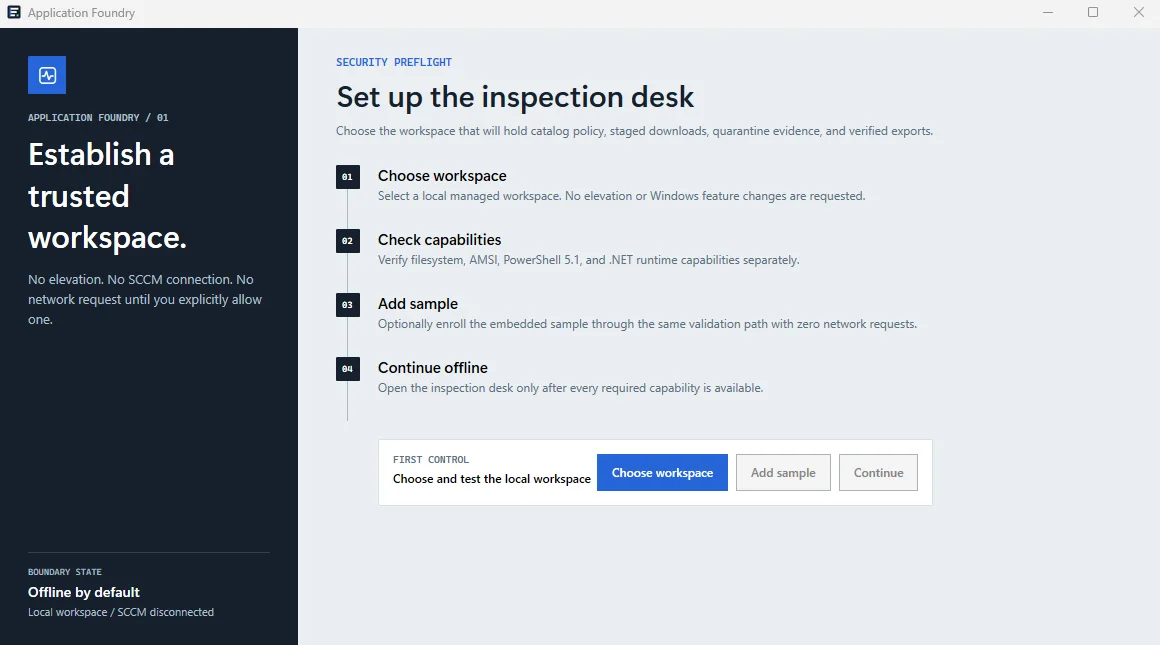
- Choose a local workspace and check the machine's required capabilities. The supplied screenshot shows this offline preflight before a network request is allowed.
- Review a recipe
- Start with an approved application definition. The recipe specifies acceptable vendor sources and packaging expectations; unknown or conflicting fields are not silently ignored.
- Check a release
- Compare the candidate with its policy and local validation results. Ready, review-required and blocked are distinct outcomes with evidence a person can inspect.
- Build and export
- Generate scripts and a bundle manifest, verify the completed files, then export a copy for the separate manual import process. A blocked item cannot be treated as deployment-ready.
How it is built
It is a local .NET 10 and WPF application designed for a standard Windows user. The interface follows a guided operations desk: a summary of application and bundle posture, an evidence view for each candidate, and bounded actions for checking, building and exporting.
Recipes are validated before use. Source provenance, integrity, signature policy and local scan results feed a fail-closed decision; an incomplete or contradictory check does not become a ready bundle. Exports carry a manifest of file hashes so the completed package can be verified again.
Availability
The release candidate built and passed its local verifier, and the installed copy was launch-tested offline. Company security review, signing, a standard-user Windows VM check and a non-production SCCM pilot remain ahead. There is no public download or production deployment claim.